
Selling on eBay: A Guide to Getting Started
>-
Selling on eBay: Signing up for the platform
To start selling on eBay, the platform offers the possibility to choose between two different types of pricing plans:
-
Individual
-
Professional
The second option includes a monthly subscription fee but offers several advantages that we will analyze shortly.
To sign up for eBay, simply go to the website and click on " Register" at the top left of the home page and enter the required data. At that point, it will be possible to choose a professional account by checking the box " Business Account".
For the professional account, you will need to enter:
-
Legal company name;
-
Address;
-
Email address;
-
Phone number.
How much does it cost to sell on eBay?
Let's now see what the costs are for selling on the eBay platform. Whether you choose an individual or professional selling plan, eBay charges a fixed fee for each listing published:
-
€0.35 for Buy It Now listings;
-
€0.50 for Auction format listings.
To these, a final value fee must be added, calculated on the sale price which varies depending on the product category. This fee is between 4.3% and 9.6%. Furthermore, eBay offers the possibility to further customize your listing by adding options such as:
-
Subtitle;
-
Reserve price;
-
Scheduled listings;
-
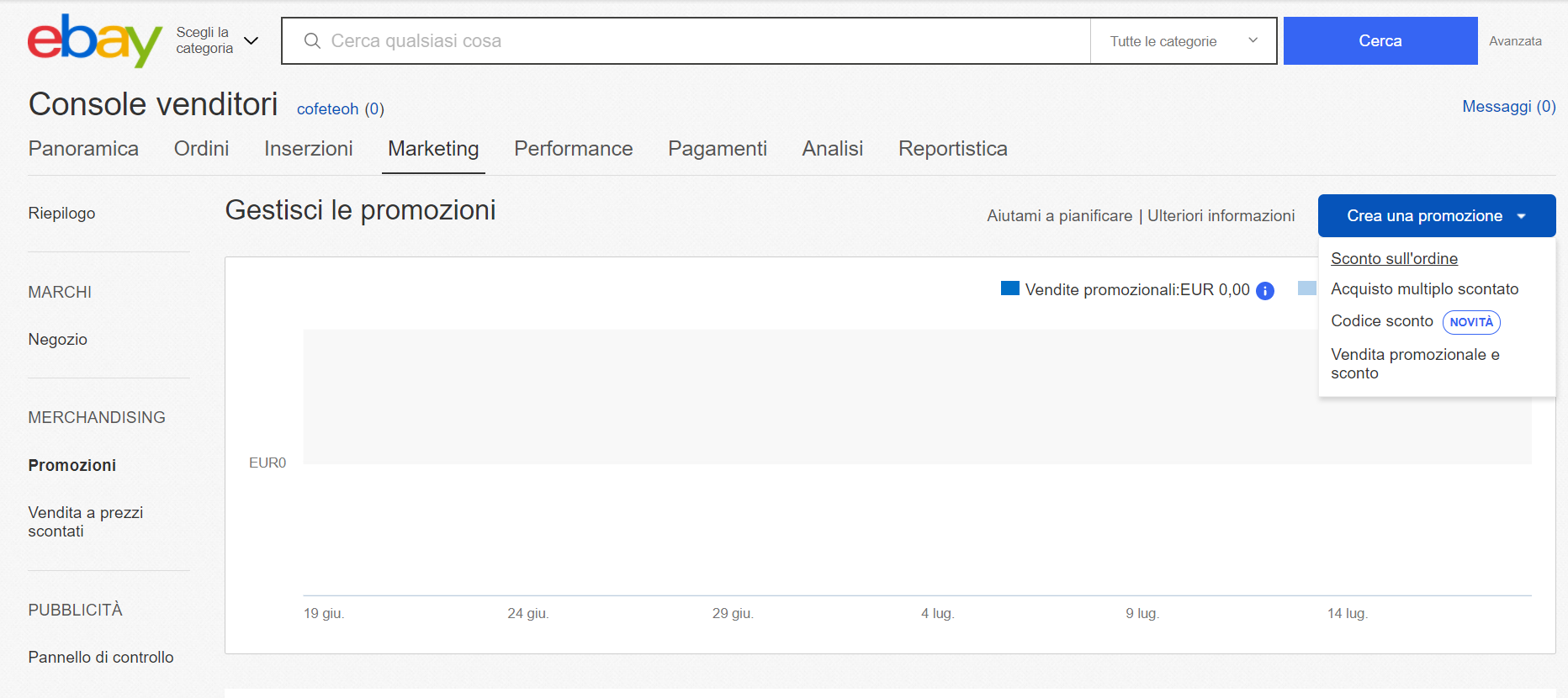
Promoted listings.
Another possibility for sellers is to open an online shop on the platform to offer users a complete showcase of their products. The eBay Store provides the seller with a series of tools that allow them to optimize their sales. There are three types of stores on eBay to choose from, depending on your needs and goals:
-
Basic Store (€19.95/month): Can also be opened by non-professional users who have linked a PayPal account to their account;
-
Premium Store (€48.19/month): For professional sellers who have opened a Business account and have obtained a seller rating of no less than 4.4 in each of the four areas (Communication, Shipping costs, Shipping time, and Item as described) for at least 12 months;
-
Premium Plus Store (€182.39/month): Aimed at professionals who have made the web their main business. It provides an unlimited number of Buy It Now format listings and 250 online Auction format listings. It can be opened by all users with a Business account who have obtained a seller rating of no less than 4.6 in each of the four areas for at least 12 months.
To open your eBay store, log in to the platform, access your account and click on "My eBay". Next, select the "Account" option and then "Subscriptions".
At this point, click on the "Subscribe" option and enter the name for your store in the Store Name field. Finally, click on the "Continue" and "Subscribe" buttons with the subscription fee.
Selling on eBay: Publishing a listing
After discussing the costs of the platform, let's now see what to know before selling on eBay.
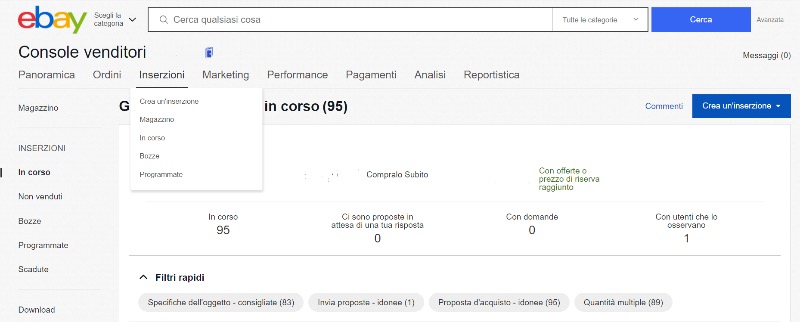
To sell an item on eBay, simply log in to your account and click on "Sell" at the top right. At this point, you must enter all the necessary data such as images, a product description, and the category.
Note: Except for some very specific categories, to sell on eBay it is not necessary to enter an EAN code . Furthermore, it is possible to sell products already present on the platform from other sellers without any difficulty. Unlike Amazon, the concept of the Buy Box does not exist on eBay. Therefore, it is possible to sell the same product as other sellers by customizing text, images and not competing downward on price.
At this point, you will simply have to choose the price and set up the product sheet to your liking.
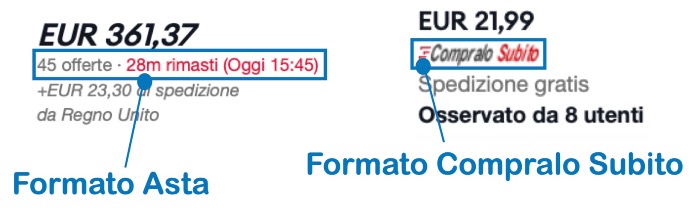
As mentioned, on eBay you can choose whether to sell in Auction format or in Buy It Now format. Let's see the differences in detail.
Online Auction:
Auctions on eBay can have a duration between 1 and 10 days, setting your starting price as desired. Additionally, you can check the box "Add Buy It Now" allowing the user to purchase without waiting for the end of the auction. If you include this option, the Buy It Now price must be at least 40% higher than the starting price.
Buy It Now:
Allows the buyer to purchase the item immediately. In this case, the listing will be managed like a normal online sale, so you will need to specify:
-
Price;
-
Quantity;
-
Listing duration.
To complete the sheet, indicate the shipping method, choosing from those listed next to the Service item (Standard package, Local pickup, Media mail, Courier etc.), indicating the price. If you want to offer free shipping, check the box next to "Offer free shipping".
It will then be necessary to choose payment methods. Some of the available options are:
-
PayPal;
-
Bank transfer;
-
Postal order;
-
Cash on delivery (COD).
There are many others that can be selected.
Important: Many payment systems involve fees. When setting the price, it will be necessary to take them into account to accurately calculate margins.
Finally, it is necessary to select shipping times and methods, choosing whether to include costs in the product price or charge them separately. Free shipping tends to make the listing more attractive and can bring benefits in terms of eBay SEO.
Selling on eBay: SEO and Promotions
On eBay, as on other marketplaces, competition is high and often fierce. Getting noticed is not always easy. To maximize visibility, small adjustments must be made. Product page optimization techniques share some traits with Amazon SEO, but with some differences.
The first step is keyword research. Before you start filling out your product sheet, you need to understand which words are most typed by users in the search bar. There are several software tools online that allow for accurate keyword research.
Avoid inserting irrelevant keywords, even if they have a high search volume. This type of strategy might increase page traffic, but it will give you visibility for a customer segment that is looking for a different product.
Focus on the keywords that best describe the product, ensuring you reach the users most interested in your item. Furthermore, the most searched keywords will also be the most competitive, and it is unlikely you will appear among the top results quickly.
Another fundamental element is images. eBay allows you to add up to 12 photos; take full advantage of this opportunity. For products with aesthetic functions (furniture, clothing, accessories), it is important that the images have a strong visual impact. In general, images must describe the product as best as possible and be as realistic as possible.
Even for more functional products, images are fundamental. In this case, rather than showing the product box from 12 angles, it could be helpful to provide images of the product in use, technical sheets, data, charts, and all the possible strengths of the item.
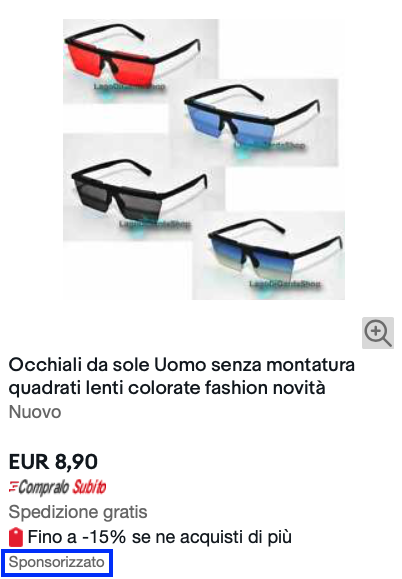
Especially during the product launch phase, an important tool provided by eBay is sponsored listings. In exchange for a higher share of profit, eBay will put your listings in the foreground for all the indicated keywords.
Sponsored listings on eBay follow a different mechanism than other platforms, where they are typically Pay Per Click (pay for each click). In fact, eBay asks you to select a percentage of the price of the listing in exchange for better placement. The higher this share, the greater the visibility offered by eBay. The platform will only collect the fee if the product is sold within 28 days following the click on the sponsored listing.
The huge advantage of this mechanism is that the advertising does not require any upfront investment, costs will always be under control, and you will always manage to get a profit from every listing.
Furthermore, by doing so, it will be possible to sponsor even products with a lower sale price. Amazon's mechanism, for example, does not make this strategy possible, as the cost of clicks is not proportional to profit margins.
Conclusions
Every e-commerce platform has its own peculiarities and, despite eBay no longer being the market leader, it offers several options that make it competitive and it should be part of every digital marketing strategy. However, it isn't always possible to have the time and ability to best manage all sales channels. To make the most of them, or if you need any other type of help with growing your online sales, contact us without obligation, otherwise:
You might also like
Come ottenere più recensioni su Amazon con Amazon Vine
Scopri come funziona Amazon Vine e le best pratice per sfruttare al meglio il programma
Vendere online: meglio su Amazon o con e-commerce proprietario?
Nel 2025, il commercio elettronico continua a crescere, offrendo opportunità per chiunque voglia avviare un'attività online. Una delle prime decisioni è scegliere tra vendere su una piattaforma consolidata come Amazon o creare un e-commerce proprietario. Entrambe le opzioni hanno vantaggi e sfide da considerare.I vantaggi di vendere su AmazonAmazon rappresenta uno dei marketplace più popolari al mondo. Vendere su questa piattaforma offre:● Visibilità immediata: con milioni di utenti giornalieri,
Perché conviene iniziare a vendere su Amazon Seller Central anche per i Vendor
Sempre più aziende stanno iniziando a vendere tramite su Amazon tramite Sellercentral | Scopri come iniziare o come migrare da Vendor con un'agenzia Amazon parnter