
Amazon Seller Feedback: what they are and how they work
>-
Amastar · Amazon Agency
Discover how we can help you integrate Amazon into your business
Book a free consultation with our team.
In this article
- 1What are Amazon feedbacks
- 2How do Amazon seller feedbacks work?
- 3How to get more seller feedback
- 4Managing negative feedback
- 5Conclusions
What are Amazon feedbacks
Seller feedbacks are an essential tool for evaluating a seller's reliability even if, unlike product reviews, they do not have relevance for Amazon SEO. Furthermore, there are no dedicated programs, at least for the moment, such as Amazon Vine for reviews.
Amazon's philosophy is to guarantee fast delivery times, quality products, and excellent services, from the return policy to customer assistance. In fact, for users, the marketplace is a synonym for absolute guarantee and, to be able to sell on Amazon, Sellers must prove they can live up to certain standards.
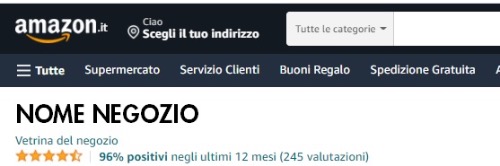
Amazon feedbacks are the expression of user judgment based on parameters such as:
-
Shipping punctuality;
-
Response time to user questions;
-
Product packaging quality;
-
After-sales assistance;
-
Management of returns and claims.
Amazon uses seller feedbacks as part of its system to monitor and evaluate Sellers. If a seller exceeds a certain threshold of negative ratings, they will receive notifications from the marketplace. Should performance fail to improve, or even worsen, the seller would risk various penalties from the algorithm, up to permanent account closure.
Even if feedbacks, as mentioned, do not directly help improve product positioning on Amazon, they can be a determining variable for winning the Buy Box. A high percentage of positive ratings, in fact, can be crucial in making the seller's name appear before that of other competitors offering equal commercial conditions.
Amastar · Amazon Agency
Discover how we can help you integrate Amazon into your business
Book a free consultation with our team.
How do Amazon seller feedbacks work?
The mechanism of seller feedbacks on Amazon closely resembles, even visually, eBay reviews. However, the platforms often follow different logics, which we have analyzed in a dedicated article .
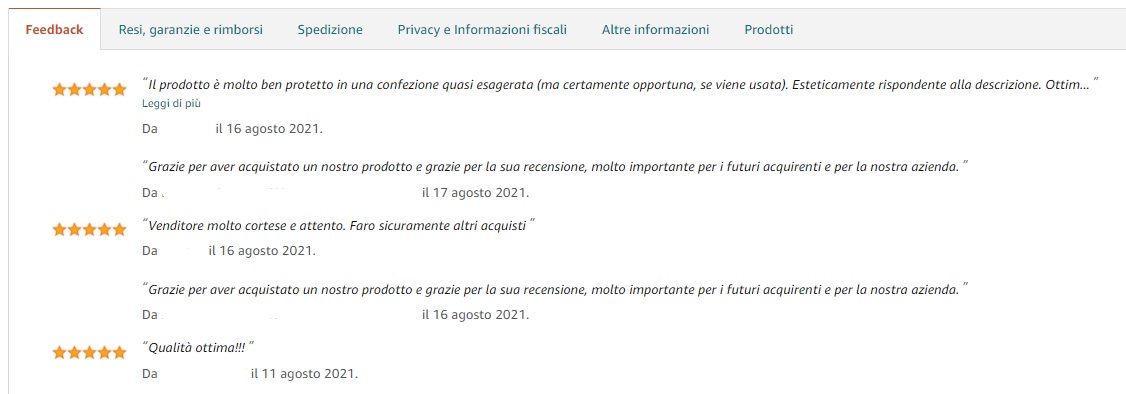
Every user, after completing a purchase, can publish a seller feedback through their account. In the "Your orders" section under "My account", buyers can click the appropriate button starting from the third day following order confirmation. Users can give a rating ranging from a minimum of 1 star to a maximum of 5.
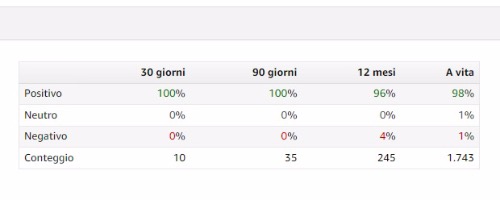
Feedbacks are divided into three categories:
-
Positive, with a rating of 4 or 5 stars;
-
Neutral, with a rating of 3 stars;
-
Negative, with a rating of 1 or 2 stars.
On the seller page, the total of positive feedbacks will be displayed with a percentage indicating the share of positive ratings out of the total.
Subscribe to the YouTube channel to stay updated!
Example: A seller who has received 180 positive ratings out of 200 will have a positive feedback percentage of 90%.
The data shown is always relative to the last year, except in cases where the seller has received fewer than 10 feedbacks in the last 365 days. In this case, overall data from the seller's entire history will be shown. As with reviews, it is not possible to directly ask buyers for positive feedback, although there are various ways to try to increase your positive feedbacks, as well as to manage negative reviews.
Amastar · Amazon Agency
Discover how we can help you integrate Amazon into your business
Book a free consultation with our team.
How to get more seller feedback
Unlike product reviews, Amazon has not provided an automated function to request feedback from individual customers. But how to get feedbacks on Amazon?
For example, the possibility for sellers to send a message to customers remains valid.
After ensuring everything went well, in a polite and indirect way, you can imply that a positive feedback would be a simple and appreciated gesture.
If sending a message to every customer proves too time-consuming, especially for accounts with a significant number of orders, we recommend adopting this tactic at least with customers with whom a contact has already been established (technical support, invoice request, shipping information, etc.)
An alternative solution can be to include a note in every package, asking the customer to rate the product positively if satisfied, or to contact the seller if they encountered issues.
The flyer should be written with simple and attractive graphics, and it can also include a coupon for a future purchase. This type of solution is generally very well-regarded.
Obviously, the best way to get positive ratings is to offer excellent quality service, even above the expectations of Amazon customers, despite the latter becoming increasingly demanding.
An unfair practice, just like with reviews, is to offer discounts, refunds, or even compensation in exchange for ratings. This action violates Amazon's guidelines and can lead to permanent account suspension.
Amastar · Amazon Agency
Discover how we can help you integrate Amazon into your business
Book a free consultation with our team.
Managing negative feedback
Until now we have focused almost exclusively on positive feedbacks, but negative ones are perhaps even more relevant. In fact, these are the ratings read most by users, who want to understand what didn't work in the past with other purchases. If they deem the seller insufficiently reliable, the broad choice of products on Amazon would lead them to turn to other competitors perceived as safer, distrusting yours.
In some cases, it is possible to remove seller feedbacks from your Amazon page by reporting a violation of guidelines by users to customer service. For example, seller reviews can be deleted if:
-
The review refers to product features and not to seller performance;
-
The feedback contains references to other brands or external sites;
-
The language of the review is vulgar and/or offensive;
-
The package is delivered damaged and/or late, but the shipment is managed through Amazon FBA.

Requesting feedback removal is quite simple and can be done in a few clicks. Furthermore, if Amazon decides to accept the seller's appeal, the removal will be immediate:
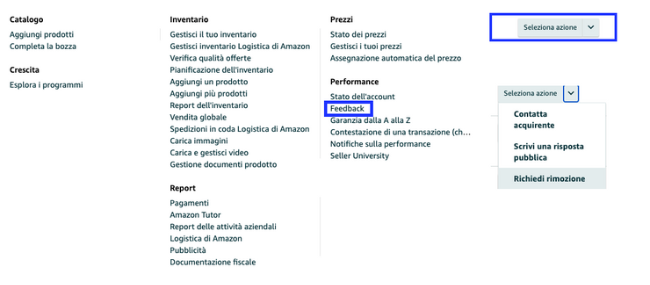
The removal decision is made automatically by a moderation algorithm. Should the latter reject the request, the option to open a case to request assistance from customer service remains valid.
Amastar · Amazon Agency
Discover how we can help you integrate Amazon into your business
Book a free consultation with our team.
Conclusions
Reputation is one of the most important factors for online sales. Feedbacks, like reviews, are a key tool for success, but managing them can take a lot of time. For this reason, we recommend turning to those who know how to manage them best.
Amastar · Amazon Agency
Discover how we can help you integrate Amazon into your business
Book a free consultation with our team.
Is it possible to remove seller feedback on Amazon?
Yes, on Seller Central it is possible to request the removal of a seller feedback if it does not comply with Amazon guidelines. In such cases, the marketplace will remove it immediately. If they do not accept the request, it is possible to open a case explaining why you believe the feedback is non-compliant, and it will be subject to a new analysis by the competent department.
What is the difference between feedback, review, and rating on Amazon?
Feedback evaluates the service offered by the seller, while reviews and ratings evaluate the product. The former also include a text comment, while the latter express only a star rating.
Are Amazon seller feedbacks important?
Absolutely yes. Even if they are not viewed by the majority of users, they can be decisive for obtaining the Buy Box. Furthermore, negative feedbacks also have an impact on account health status.
You might also like
Come ottenere più recensioni su Amazon con Amazon Vine
Scopri come funziona Amazon Vine e le best pratice per sfruttare al meglio il programma
Vendere online: meglio su Amazon o con e-commerce proprietario?
Nel 2025, il commercio elettronico continua a crescere, offrendo opportunità per chiunque voglia avviare un'attività online. Una delle prime decisioni è scegliere tra vendere su una piattaforma consolidata come Amazon o creare un e-commerce proprietario. Entrambe le opzioni hanno vantaggi e sfide da considerare.I vantaggi di vendere su AmazonAmazon rappresenta uno dei marketplace più popolari al mondo. Vendere su questa piattaforma offre:● Visibilità immediata: con milioni di utenti giornalieri,
Perché conviene iniziare a vendere su Amazon Seller Central anche per i Vendor
Sempre più aziende stanno iniziando a vendere tramite su Amazon tramite Sellercentral | Scopri come iniziare o come migrare da Vendor con un'agenzia Amazon parnter