
Amazon Advertising: how to advertise a product on Amazon
>-
Selling on Amazon is not easy. Especially in the initial phase, gaining good visibility can take a lot of time. Amazon SEO is certainly the first aspect to work on, but it might not be enough to generate those first sales. In this article, we will explain what Amazon Advertising is, how much it costs to advertise on Amazon, and how to create an ADV campaign.
Amastar · Amazon Agency
Discover how we can help you integrate Amazon into your business
Book a free consultation with our team.
Amazon sponsored ads represent the best way to increase the visibility of your products and obtain your first sales. However, if not set up correctly, ADV campaigns can turn out to be particularly expensive and ineffective. Furthermore, PPC ads require constant monitoring.
Over time, Amazon has made an increasing number of advertising tools available. Below we will analyze all the main ones, trying to understand which are most suitable for products in each category.
Subscribe to the YouTube channel to stay updated!
What is Amazon Advertising and how does it work?
The first questions we are asked by sellers are: how does advertising on Amazon work and how much does it cost to advertise products on the platform? Product sponsorship campaigns on Amazon follow a Pay per Click (often abbreviated as PPC) mechanism, similar to the one offered by Google Ads.
In practice, each seller decides to dedicate a certain budget to some keywords of their choice; in exchange, Amazon will offer the product greater visibility.
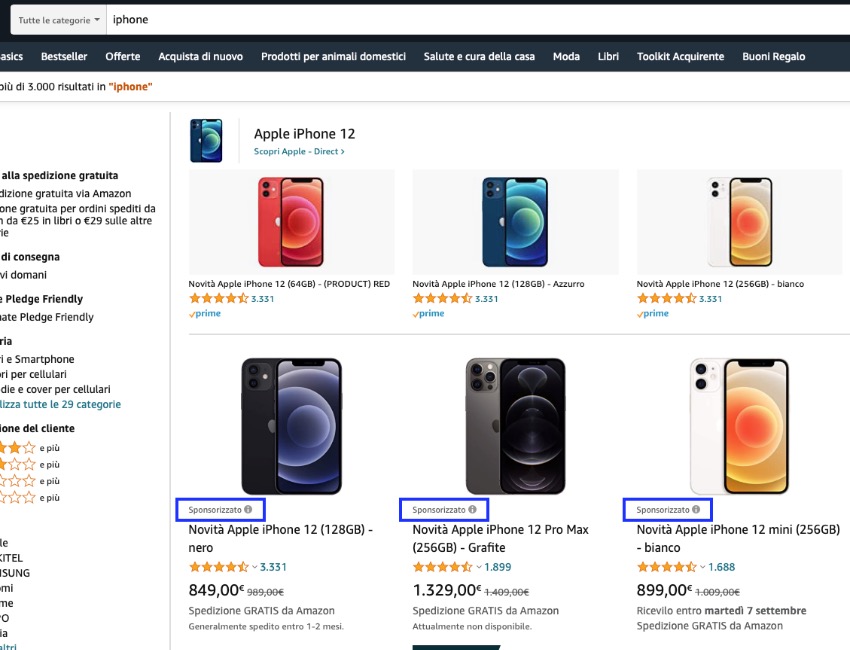
Example of sponsored ads for the search query "iPhone".
At this point, the user will decide whether to scroll further down the page or click on the ad. In the latter case, a cost will be charged.
Note: Amazon will charge the cost of the click regardless of whether the user makes the purchase or not.
Amastar · Amazon Agency
Discover how we can help you integrate Amazon into your business
Book a free consultation with our team.
Types of advertising campaigns
After the brief introduction, let's now see how to advertise your products on Amazon. As mentioned, Amazon provides different types of sponsored ads for product promotion.
But what are the three main types of Amazon Advertising campaigns to promote products in a Seller account?
Let's try to analyze the main ones.
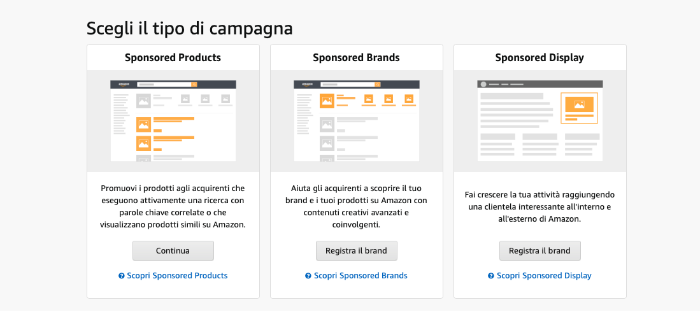
Sponsored Product Ad Campaigns
In the Amazon advertising console, when creating a campaign, it is possible to choose between different options.
The first entry that appears is Sponsored Product ads which, in turn, are divided into two subcategories:
-
Targeting by keywords, selecting the keywords for which you wish to appear among the top results;
-
Targeting by product, selecting product pages—typically competitors—on which we would like Amazon to show us as an alternative.
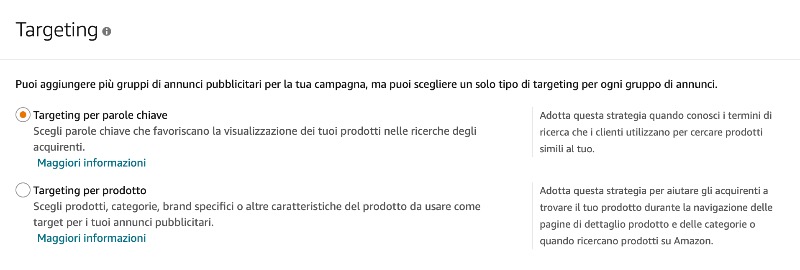
At the campaign personalization level, it is possible to make a further distinction between:
-
Automatic campaigns, in which Amazon automatically chooses which keywords to sponsor the product for;
-
Manual campaigns, in which you can select individual keywords or individual competitor ASINs on which to increase your visibility.

Note: In automatic campaigns, Amazon combines keyword targeting with product targeting. For manual ones, however, it is necessary to create two different ad groups if you want to use both tools.
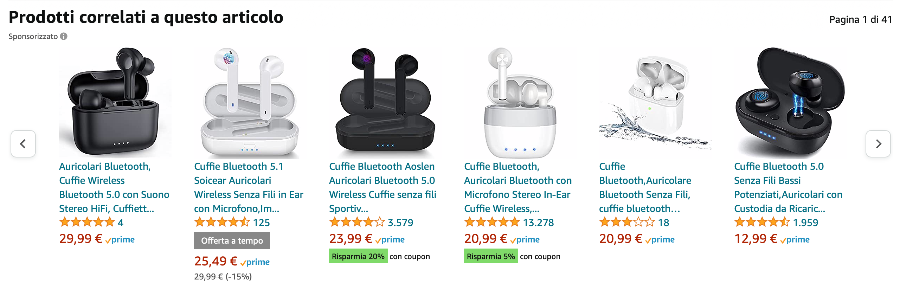
Example of sponsored ads for related items.
Amastar · Amazon Agency
Discover how we can help you integrate Amazon into your business
Book a free consultation with our team.
Sponsored Brands
The second type of ads offered by Amazon is Sponsored Brands. These are more sophisticated advertising tools initially made available only to Vendor accounts, but later extended also to Sellers. The only requirement to create this type of campaign is to have a registered brand.
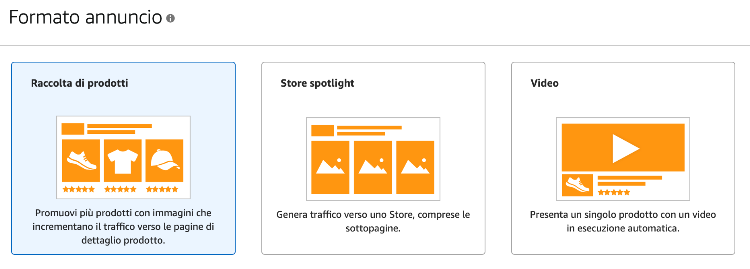
Sponsored Brands campaigns are divided into 3 subcategories:
-
Product Collection, where you choose 3 products you wish to highlight;
-
Store Spotlight, where you sponsor a banner that links to your Amazon Store;
-
Video, where you can have a short clip appear between the third and fourth line of search results.
This last type is certainly the most engaging as the video is played automatically—albeit without sound—without the user clicking any command, immediately giving a high-impact impression of the product.
Product Display
The last category is Product Display ads (Sponsored Display). This is the type of campaign introduced most recently and, as with Sponsored Brands, it is available only for registered brands. With this tool, Amazon allows you to show your ad with banners positioned in different parts of the page, not unlike advertising on traditional websites.
For the creation of these campaigns, a daily budget is required along with a choice of an objective between:
-
Optimize for viewable impressions;
-
Optimize for page visits;
-
Optimize for conversions.
Furthermore, you can choose targeting by product or by audience. In the latter case, the ad will also appear outside of Amazon itself. This represents an absolute novelty and a major change in direction for the e-commerce giant.
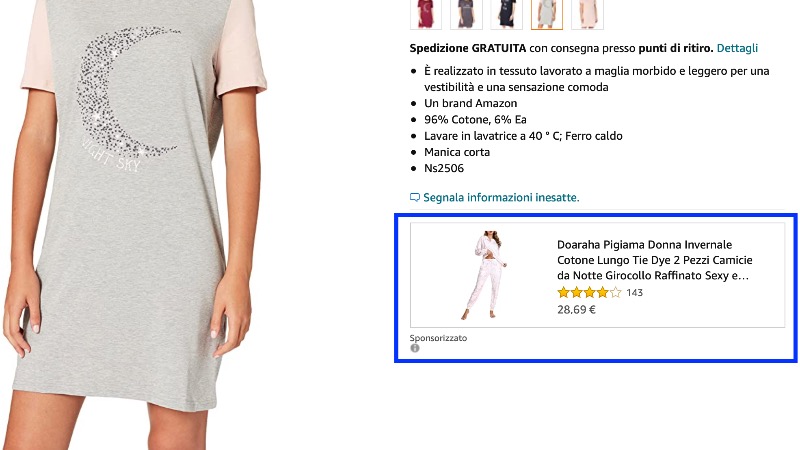
Example of a Product Display ad inside Amazon.
Amastar · Amazon Agency
Discover how we can help you integrate Amazon into your business
Book a free consultation with our team.
Sponsored Display campaigns are an increasingly integral part of advertising strategies on Amazon. While in the early days they often turned out to be excessively expensive and presented many targeting problems, they have now become an almost essential tool for all brand owners, as the marketplace has been able to target them better and better, making them extremely effective.
How to do ADV on Amazon
The tools made available by the Seller Central platform are numerous and, since there is no universally valid formula for success to optimize your ACoS (the ratio between the amount spent on advertising campaigns and the sales generated thanks to them), it is not always easy to set up your advertising campaigns correctly.
Our general advice is to start working with Sponsored Products, then implement the other tools at a later stage.
Depending on the budget, category, and your level of experience, you can choose whether to start with manual campaigns, automatic ones, or a combination of both.
For the setup of manual campaigns, you must first carry out a careful keyword analysis, and then create a tailored ad. For the initial phase, our experience suggests working on a number between 5 and 10 keywords, as relevant as possible to the product. We advise against, at least in this phase, working on keywords that do not exactly match the item or are excessively generic. In fact, campaigns of this type would certainly generate a high number of clicks, but likely a low conversion rate. Conversely, for keywords closer to the product, the conversion will be significantly higher. Furthermore, high-traffic keywords have a higher cost per click because competition is typically greater.
But how much does a click cost on Amazon? Being an auction mechanism, there is no standard answer.
As an offer for a keyword, we recommend starting with a low figure, perhaps around €0.20, and then gradually increasing it if not enough impressions are generated.
Regarding the setup of automatic campaigns, however, the work is completely different. Creating the ad will require only a few seconds and no keyword research; then Amazon will do the rest.
Work on this type of campaign will begin later, starting 1-2 weeks after creation and will involve pure data analysis. Thanks to the detailed reports made available by Seller Central, we can see which keywords are working best, those that are proving to be excessively expensive, and for which keywords (or competitor products) Amazon is sponsoring our ad.
Monitoring of this kind requires time and consistency, but it is the best way to make campaigns increasingly efficient.
We also recommend utilizing the negative keywords tool, inserting all terms for which we would not want Amazon to show our ad. Often, automatic campaigns generate clicks for completely wrong keywords.
Note: The analysis of this type of reporting can be very complicated; for this reason, we recommend—especially for beginners and/or those with a limited budget—contacting professionals or using software like Advigator , which allows you to set your advertising goals and manage campaigns quickly and automatically.
Duration of Amazon ADV campaigns
We are very often asked how long to advertise on Amazon.
Our answer is that, except in special cases, sponsored ads should not have an end date. In fact, sales are the core of the Amazon algorithm. Therefore, the more you sell—with sponsored campaigns and otherwise—the better the organic positioning of the product will be.
Campaigns help both to generate direct sales and to improve the keyword ranking of the sponsored ASIN.
Furthermore, sponsored ads usually occupy the first 4 positions of search results on Amazon. The first organic result, however, occupies the fifth, which is the first position of the second row. Although it might seem trivial, this means an enormous loss of visibility. An internal analysis based on keywords for which our clients occupied the first organic position revealed that within 20-30 days sales were reduced by about 27%, also losing some ranking positions. As soon as the campaigns were reactivated, the values returned to normal in almost all cases within 10-15 days.
Therefore, our advice is to keep campaigns always active, monitoring them constantly. If they prove to be excessively expensive, it would still be appropriate to conduct an analysis and work only on the highest-performing keywords or ad groups.
Amastar · Amazon Agency
Discover how we can help you integrate Amazon into your business
Book a free consultation with our team.
Conclusions
Advertising on Amazon is an almost indispensable tool for launching your brand, especially in the initial phase. The advertising tools provided by Amazon are increasing, and besides requiring a lot of time, they can prove to be very costly if not used appropriately. For this reason, for those who are beginners, lack experience, and/or have a large budget to invest, we recommend contacting those who work with Amazon ADV every day. For any questions:
Amastar · Amazon Agency
Discover how we can help you integrate Amazon into your business
Book a free consultation with our team.
How does advertising on Amazon work?
Advertising campaigns on Amazon operate on a Pay Per Click (PPC) basis. Amazon applies a cost every time a user clicks on a sponsored ad, regardless of whether they buy the product or not.
How much does sponsorship on Amazon cost?
Sponsoring on Amazon does not have a defined cost. It is possible to set a daily budget for each campaign, after which Amazon will pause it. The cost for each click depends on many factors; the most important is certainly the competitiveness of a keyword. The more products are sponsored for a keyword, the higher the click cost will be.
How do you pay for Amazon Ads?
The cost of advertising on Amazon can be deducted directly from your marketplace balance or charged to a separate credit card.
How to promote on Amazon?
Promoting a product on Amazon is increasingly fundamental for increasing sales on the marketplace. The main tools are advertising campaigns (Sponsored Product, Brand, and Display), but there are also many promotional tools available such as coupons, quantity discounts, and much more.
You might also like
Come ottenere più recensioni su Amazon con Amazon Vine
Scopri come funziona Amazon Vine e le best pratice per sfruttare al meglio il programma
Vendere online: meglio su Amazon o con e-commerce proprietario?
Nel 2025, il commercio elettronico continua a crescere, offrendo opportunità per chiunque voglia avviare un'attività online. Una delle prime decisioni è scegliere tra vendere su una piattaforma consolidata come Amazon o creare un e-commerce proprietario. Entrambe le opzioni hanno vantaggi e sfide da considerare.I vantaggi di vendere su AmazonAmazon rappresenta uno dei marketplace più popolari al mondo. Vendere su questa piattaforma offre:● Visibilità immediata: con milioni di utenti giornalieri,
Perché conviene iniziare a vendere su Amazon Seller Central anche per i Vendor
Sempre più aziende stanno iniziando a vendere tramite su Amazon tramite Sellercentral | Scopri come iniziare o come migrare da Vendor con un'agenzia Amazon parnter