
How to sell a product on Amazon
>-

Amazon is the undisputed leader of online sales. The platform receives millions of visits every day, and having a presence on the marketplace seems indispensable for those who want to sell through digital channels. In this article, we will explain how to start selling on Amazon and how to add products to your catalog. For those at a more advanced stage who want to understand how to increase sales on Amazon and improve product positioning, we recommend reading our article on how the Amazon algorithm works.
Amastar · Amazon Agency
Discover how we can help you integrate Amazon into your business
Book a free consultation with our team.
In this article
- 1How to sell a product already present on Amazon
- 2How to upload multiple products to Amazon
- 3Uploading products not present on Amazon
- 4Main difficulties in uploading products to Amazon
- 5Conclusions
How to sell a product already present on Amazon
For those who have never sold on the marketplace, SellerCentral - the management platform for Amazon sellers - can appear incomprehensible and particularly complicated to manage. And, unfortunately, it is. It will take some effort and, above all, a lot of practice to learn to deeply understand at least its basic functions.
The first step after registration is undoubtedly uploading the first product to the catalog.
And this is where you encounter the first fork in the road. In fact, after clicking on Catalog > Add products, Amazon will ask if the product is already present.
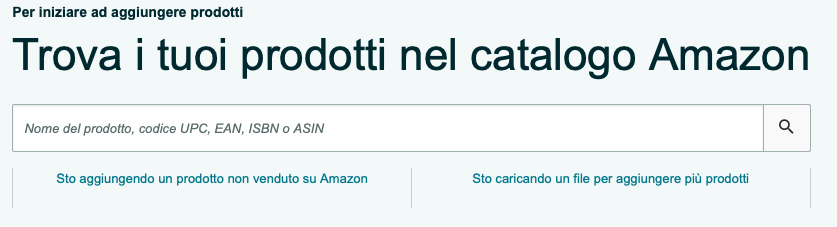
In the event of a positive response, you will need to indicate the identifier of the item you want to add (EAN code, ASIN, UPC, etc.). If Amazon finds a match between the ID you entered and a product in its database, you will only be asked for:
-
What is the product condition (new, used, refurbished, etc.);
-
The SKU code. This is an optional entry used solely by sellers to assign their own identifier to products (for example, if items are on sale on multiple marketplaces);
-
The price;
-
Who manages the logistics. If you decide to entrust it to Amazon (FBA), you will need to create a shipping order. If you manage it independently (FBM), you will also be required to indicate the quantities of product available.
Once the item is inserted, you will "attach" yourself to the existing product page. In fact, unlike other marketplaces like eBay, on Amazon each product corresponds to a single listing.
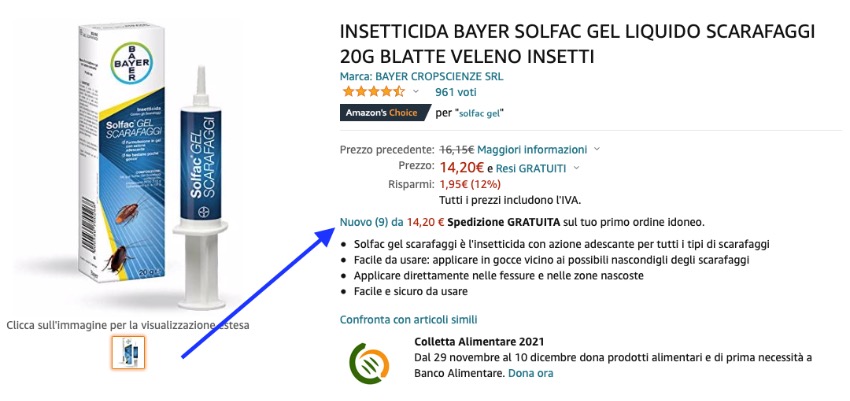
But how do you sell on Amazon if sellers are all grouped on the same page? To stand out and increase your visibility, you must be the seller offering the products at the best conditions based on criteria established by Amazon. To appear first, and likely be chosen by customers for their purchases, you must win what is known as the Buy Box. We have dedicated a specific article to this topic.
Regarding the Amazon SEO side, since you will be relying on product pages already created by others, your room for maneuver will be very limited. In fact, it will not even be possible for you to modify the product text and images. To do so, you would have to contact the primary seller or open a ticket with Amazon customer support, which is unlikely to accept your request.
Subscribe to the YouTube channel to stay updated!
How to upload multiple products to Amazon
Many of the companies that contact us to start selling on Amazon have various products in their catalog, sometimes tens of thousands. Adding items one by one, however relatively fast a single operation might be, would be virtually impossible. So, how do you upload the entire inventory to Amazon then?
The marketplace provides professional sellers with the ability to upload the entire catalog using a CSV file. In the same screen seen previously, you will need to select the option I'm uploading a file to add multiple products, set the columns of your CSV based on the category and products you want to add, and download the file. After filling it out carefully and as completely as possible, you will upload it by accessing the same section.
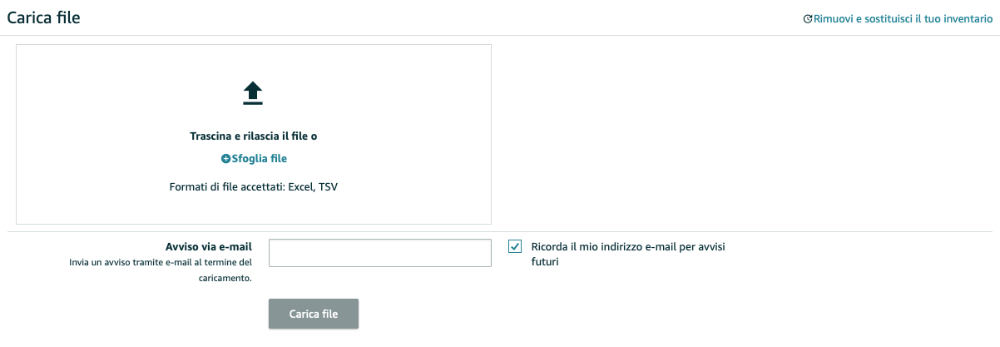
Filling out documents of this type can be complicated the first few times. For this reason, Amazon has decided to include a complete tab within the file explaining all fields and one where an example is shown for each.
Note: Uploading products via CSV file is the marketplace's preferred method. In case of issues, customer service suggests making changes to your listings using this specific mode.
Uploading products not present on Amazon
So far, we have analyzed the case where you decide to sell products already present on Amazon. But how do you sell a product of your own brand or one not yet present on the platform?
It's not complicated; it just requires a few extra steps.
The starting point is always the Add a Product section, but in this case, we must select the option I am adding a product not sold on Amazon. At this point, you will be required to choose the category for your product. You can search manually or use the search function. Category is very important. Our advice, if you are undecided and cannot find the most appropriate one for your products, is to do a brief search and see which ones are chosen by your competitors. If you don't find the exact category, at least you'll know where you are competing in the most relevant section.

Once the choice is made, you must fill in all the mandatory fields to start selling your product on Amazon. The mandatory attributes are not the same for every product, but some are required regardless of category:
-
Product identifier (EAN, ASIN, etc.), unless you have obtained an exemption for EAN codes;
-
Title, max 200 characters;
-
Price;
-
Logistics. As before, if you decide you will be the one shipping, you must also enters the quantity;
-
Country of origin;
-
Product condition;
-
At least one image.
Note: Images are not marked with the typical red box indicating mandatory attributes, and you will be able to save the listing without having inserted one. However, by not including images, in addition to making the product virtually unsellable, you will receive an error notification later.
After saving and waiting a few minutes, if the product quantity is greater than zero and you have filled everything in correctly, your product should start to be visible on Amazon.
Amastar · Amazon Agency
Discover how we can help you integrate Amazon into your business
Book a free consultation with our team.
Main difficulties in uploading products to Amazon
As we have seen, uploading products and starting to sell on Amazon is not particularly complicated. However, the platform is full of pitfalls for those preparing to use it for the first time.
Some sellers encounter problems even before starting and find themselves asked for certain authorizations such as:
-
Selling in a specific category;
-
Selling products of another brand.
In this case, Amazon will require additional documentation such as licenses, compliance requirements, or mandates from the brand owner.
Other problems can arise after the product page is created and refer to the quality of the inserted attributes. In fact, it is possible for Amazon to accept the creation of the listing but recognize some type of error at a later time. Among the most frequent reported to us:
-
The image does not comply with guidelines;
-
Potential price error, too high or too low;
-
Title, bullet points, or search terms exceed the allowed character limit;
-
Necessity to add further mandatory attributes.
Another difficulty for sellers is not being able to find newly uploaded products on the platform using the search bar. In this case, the only solution is to wait. Amazon is transforming into a true search engine, and product indexing is not immediate.
A separate discussion, as indicated in the introductory section, is deserved for the difficulty of obtaining the first sales on Amazon. Platform traffic is constantly increasing, but so are the companies wanting to exploit the online sales opportunity. To sell, it is important to work on Amazon SEO, advertising, product page optimization, and all aspects revolving around such a complex platform. For beginners, our advice is always to turn to those with experience in the sector, saving a significant amount of time and avoiding excessive expenses.
Conclusions
There are several ways to upload products to Amazon, and they depend mainly on whether or not the items are already on the platform. In the case of products already present, the process is faster and certainly less demanding, but it doesn't leave much room to increase product visibility. For new items, however, it is possible to work on a strategy that allows for increased sales on Amazon. Especially in the second case, our advice is to turn to those who already have experience in the sector to climb the rankings as quickly and efficiently as possible. For any questions on how to upload products or increase sales on Amazon:
Amastar · Amazon Agency
Discover how we can help you integrate Amazon into your business
Book a free consultation with our team.
You might also like
Come ottenere più recensioni su Amazon con Amazon Vine
Scopri come funziona Amazon Vine e le best pratice per sfruttare al meglio il programma
Vendere online: meglio su Amazon o con e-commerce proprietario?
Nel 2025, il commercio elettronico continua a crescere, offrendo opportunità per chiunque voglia avviare un'attività online. Una delle prime decisioni è scegliere tra vendere su una piattaforma consolidata come Amazon o creare un e-commerce proprietario. Entrambe le opzioni hanno vantaggi e sfide da considerare.I vantaggi di vendere su AmazonAmazon rappresenta uno dei marketplace più popolari al mondo. Vendere su questa piattaforma offre:● Visibilità immediata: con milioni di utenti giornalieri,
Perché conviene iniziare a vendere su Amazon Seller Central anche per i Vendor
Sempre più aziende stanno iniziando a vendere tramite su Amazon tramite Sellercentral | Scopri come iniziare o come migrare da Vendor con un'agenzia Amazon parnter